Connect two Sparks
You have two DGX Sparks and want them to act as one larger machine, for models up to ~405B parameters or for distributed fine-tuning.
The idea is a direct point-to-point link between the two ConnectX-7 200GbE ports, running RoCE (RDMA over Converged Ethernet) for high-throughput, low-latency GPU-to-GPU communication.
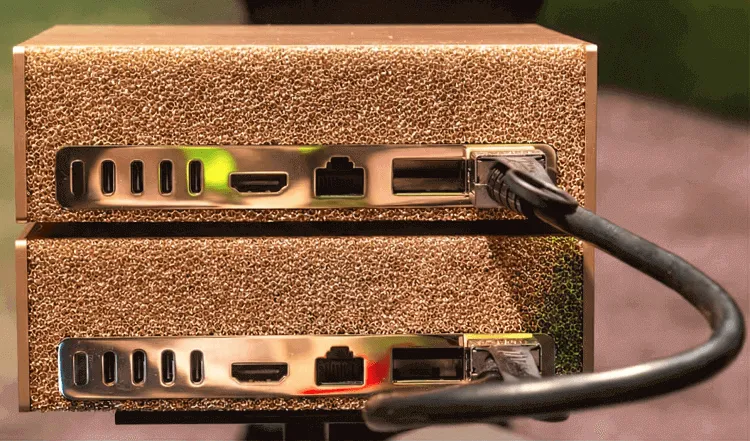
Two Sparks linked directly over a 200GbE ConnectX-7 (QSFP) cable. Image: FiberMall.
What you need
Section titled “What you need”- Two Sparks, both running DGX OS with NVIDIA drivers.
- An approved QSFP cable between the two CX-7 ports. NVIDIA lists the Amphenol
NJAAKK-N911(and the 0.5 mNJAAKK0006) and the LuxshareLMTQF022-SD-R. sudoon both, and internet access for the initial software setup.
Cable and identify
Section titled “Cable and identify”-
Connect the QSFP cable directly between the CX-7 ports on the two units.
-
Identify which OS interface maps to the physical port. Each QSFP port shows up under two interface names; prefer the
enp1...primary. The authoritative tool is:Terminal window ibdev2netdev
Configure the link
Section titled “Configure the link”The recommended path for a single-cable setup is automatic link-local addressing via netplan. Following NVIDIA’s Connect Two Sparks playbook, on both nodes:
sudo wget -O /etc/netplan/40-cx7.yaml <url-from-the-playbook>sudo chmod 600 /etc/netplan/40-cx7.yamlsudo netplan applyThis assigns link-local 169.254.x.x addresses on the fast interface. For a dual-cable full-bandwidth setup you must assign static IPs manually so all four interfaces are addressed.
The netplan drop-in lives alongside the system’s other network config:
Directory/etc/netplan/
- 00-installer-config.yaml the stock DGX OS config (leave it)
- 40-cx7.yaml the CX-7 fast-link config you just added
Enable orchestration
Section titled “Enable orchestration”Multi-node jobs need passwordless SSH between the same username on both nodes. NVIDIA’s discover-sparks.sh automates this using mDNS/Avahi.
NCCL and the fast interface
Section titled “NCCL and the fast interface”GPU collective operations go through NCCL, which on the Spark must be built for Blackwell compute capability sm_121. You also have to force NCCL traffic onto the 200GbE interface rather than the 1GbE management network, via environment variables documented in the playbook.
If you run the workload in Docker, the container needs host networking and the RoCE device mapped in:
docker run --network=host --device=/dev/infiniband --ulimit memlock=-1 ...Verify
Section titled “Verify”Confirm the link with standard network tools and an NCCL communication test. Once it passes, the pair is ready for distributed serving (vLLM/Ray, TensorRT-LLM multi-node) or distributed training.
For the conceptual picture of why this works and where the bottlenecks are, read multi-Spark networking.